Welcome: Hunan CKSKYintelligent Technology Co., LTD
Language:


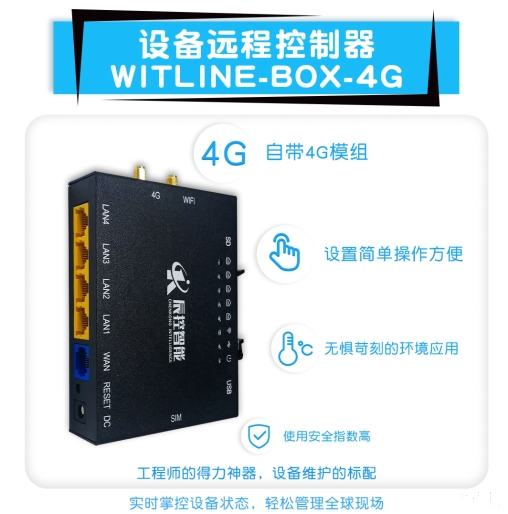
Firstly, prepare a WITLINE-BOX-4G device remote controller using Chenkong Intelligence. The default gateway of the device is 192.168.10.1, with a Siemens/domestic 300 series CPU. The default gateway of the device is also 192.168.10.1, and the IP address is 192.168.10.178, which cannot conflict with the device remote controller.
The following steps are described:
Step 1: Set the default gateway of ETH-S7300 to 192.168.10.1, with an IP address of 192.168.10. *, and a range of 2-255 that does not conflict with the default gateway of the remote device. Here, we set it to 192.168.10.6.
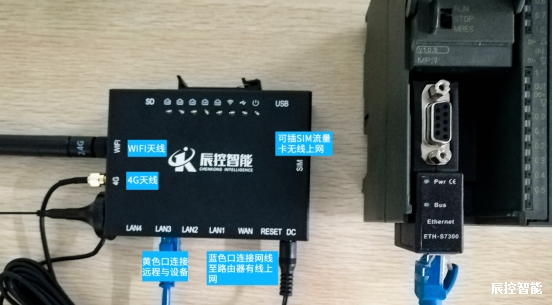
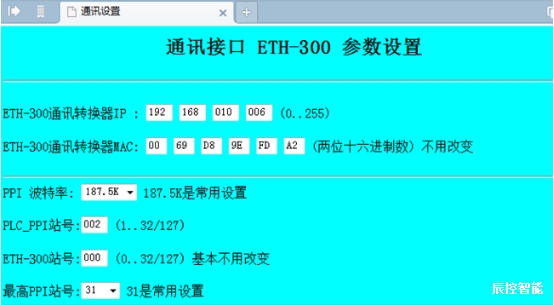
Step 2: Set up the remote access account for the remote controller of the WITLINE-BOX 4G device, and ensure that the traffic card or wired network can access the internet normally after setting it up. The first time using WITLINE-BOX-4G, you need to install the driver, go all the way to the next step, and then open the client software to input the ID number and username password to achieve remote global security.
(For example, domestically produced 300CPU+WITLINE-BOX-4G is located in the United States, and the upper computer is located in China. By opening the client connection, remote debugging, maintenance, or monitoring can be achieved through on-site control in the United States, achieving global intelligent control.)
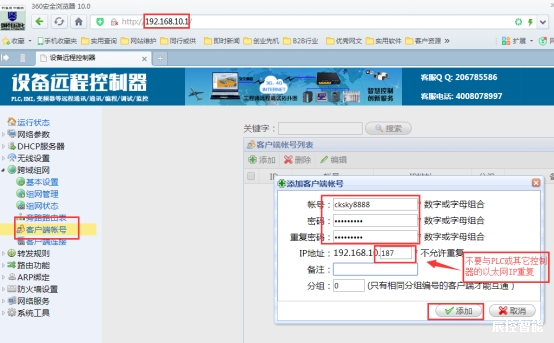
No need to establish a third-party server, port mapping, domain name resolution, or fixed IP address
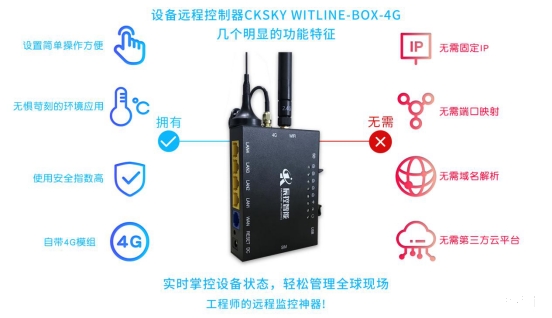
Simply set up in two easy steps to remotely monitor on-site devices, intelligently control the world, and ensure safety and stability.

Contact: FU Bin
Phone: 18072812386
Tel: 0731-85203816
Email: market@cksky.com.cn
Add: changsha